
Mind Map AR, Augmented Reality ARCore Mind Mapping1.29.1 - Google Play
You'll be able to see results in few seconds.
Publisher Description
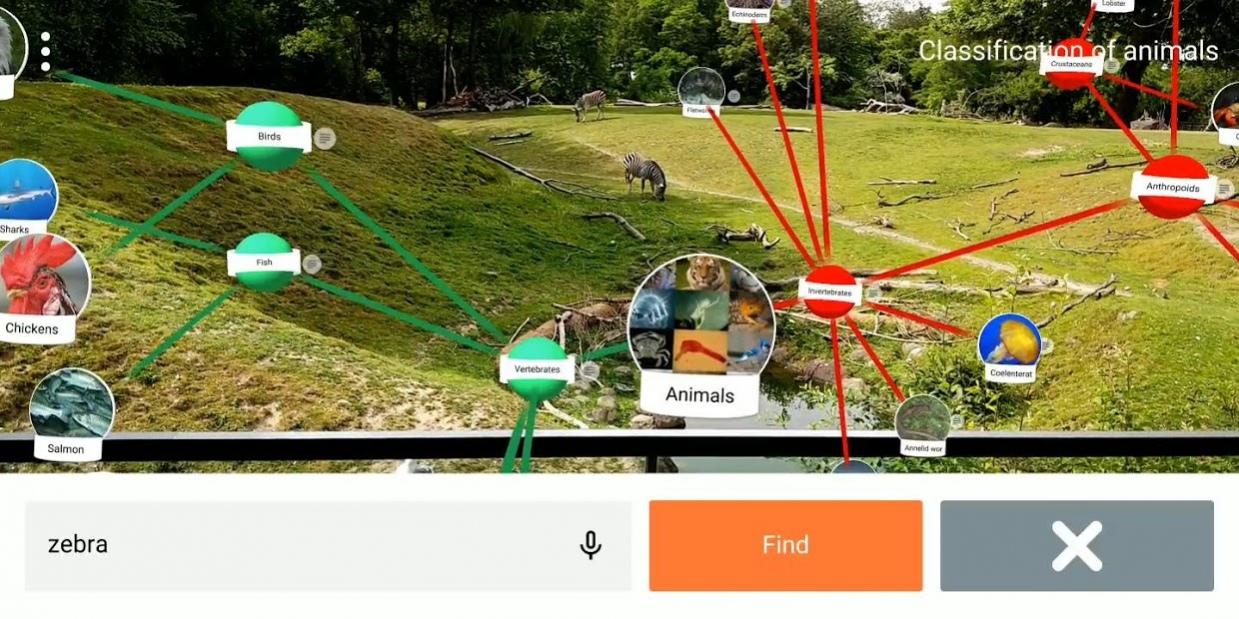
Free mind maps from 2D with the first augmented reality mind mapping app for Google ARCore. Build and explore mind maps like never before with an ARCore capable smartphone and Mind Map AR.
Standard Feature Highlights:
- 3D augmented reality mind mapping
- Easy to use
- Cast mind maps to a big screen using Chromecast
- Share mind map files or export a text outline
- Hyperlink support
- Attachments in cloud storage (GDrive, OneDrive, Dropbox, Evernote)
- Instant voice input
- Add long-text details to mind map nodes
- Import FreeMind files
- Expand/Collapse branches
- Directional relationships
- VR Canvas background options
Premium Features:
- Image Nodes
- Node Move
- Multiple Roots
- Custom Coloring
- Multiple Node Hyperlinks
- Tag Filtering
- Jump Links
Full Documentation at https://www.mindmapar.com
THE ADVANTAGE OF AR MIND MAPPING
Your brain organizes using relationships, and it thinks in 3D. That's why it is easy to remember details of places and structures. You can unleash this innate power of your brain’s hippocampus by mind mapping in 3D with augmented reality. For the first time, your ideas can fill a room. You can walk through and around your AR mind maps. You can see your thinking from every possible angle to stimulate new insights.
You will be amazed as you create ideas and build relationships between concepts that mirror how your brain stores and processes information. Mind Map AR by ScapeHop delivers a new world of thought generation and exploration.
You will find brainstorming comes easy as you interact with innovative ideas without constraints using Mind Map AR. No need to waste time on formatting, sequencing or spacing on a surface. Instead, stay in a consistent mental flow that boosts your cognitive performance and taps into your full potential.
⚠ ARCORE AND A SUPPORTED DEVICE ARE REQUIRED FOR THIS APP TO WORK ⚠
ARCore works on the following models right now: https://developers.google.com/ar/discover/supported-devices
To download and install ARCore on a supported device go to:
https://play.google.com/store/apps/details?id=com.google.ar.core
If you have an issue with Mind Map AR, please email us at support@scapehop.com to give us an opportunity to help.
About Mind Map AR, Augmented Reality ARCore Mind Mapping
The company that develops Mind Map AR, Augmented Reality ARCore Mind Mapping is ScapeHop. The latest version released by its developer is 1.29.1.
To install Mind Map AR, Augmented Reality ARCore Mind Mapping on your Android device, just click the green Continue To App button above to start the installation process. The app is listed on our website since 2019-06-01 and was downloaded 0 times. We have already checked if the download link is safe, however for your own protection we recommend that you scan the downloaded app with your antivirus. Your antivirus may detect the Mind Map AR, Augmented Reality ARCore Mind Mapping as malware if the download link to com.scapehop.mindmapar is broken.
How to install Mind Map AR, Augmented Reality ARCore Mind Mapping on your Android device:
- Click on the Continue To App button on our website. This will redirect you to Google Play.
- Once the Mind Map AR, Augmented Reality ARCore Mind Mapping is shown in the Google Play listing of your Android device, you can start its download and installation. Tap on the Install button located below the search bar and to the right of the app icon.
- A pop-up window with the permissions required by Mind Map AR, Augmented Reality ARCore Mind Mapping will be shown. Click on Accept to continue the process.
- Mind Map AR, Augmented Reality ARCore Mind Mapping will be downloaded onto your device, displaying a progress. Once the download completes, the installation will start and you'll get a notification after the installation is finished.
Program Details
System requirements
Download information
Pricing
Version History
version 1.29.1
posted on 2019-06-01
Thanks to the support of our paying users!
- Outline arranging and export to a Word doc.
- Web search for added hyperlinks
- Improved text input and selection
- Two fingers drag rotation
- Press and hold to define a new rotation point
- Larger node labels
- More responsive drag speed
- Scroll control in text fields
- Ads option for free users to try premium features
- Screen shot button
- Tablet scaling for ARCore capable tablets
Please leave your rating and review!
Disclaimer
Official Google Play Link
We do not host Mind Map AR, Augmented Reality ARCore Mind Mapping on our servers. We did not scan it for viruses, adware, spyware or other type of malware. This app is hosted by Google and passed their terms and conditions to be listed there. We recommend caution when installing it.
The Google Play link for Mind Map AR, Augmented Reality ARCore Mind Mapping is provided to you by apps112.com without any warranties, representations or guarantees of any kind, so access it at your own risk.
If you have questions regarding this particular app contact the publisher directly. For questions about the functionalities of apps112.com contact us.
